With the latest Odoo versions, artificial intelligence is no longer an add-on but an integral part of the ERP system.
Odoo AI Agents provide an AI experience comparable to well-known assistants such as ChatGPT or Gemini — but fully embedded within Odoo and directly integrated into business processes.
Instead of using isolated AI tools, users work with context-aware intelligence directly inside the Odoo interface: in quotations, invoices, projects, tickets, or master data. AI Agents access clearly defined knowledge sources and provide support exactly where decisions are made and daily tasks are carried out.
This article provides a practical overview — clear, concrete, and with direct reference to the Odoo user interface.
Key Takeaways
- Artificial intelligence has been fully integrated into all business areas since version 19.
- Odoo AI Agents are specialized AI assistants built directly into the Odoo ERP.
- They use approved knowledge sources such as documents and PDFs to provide contextual answers.
- AI Agents are configured in the Odoo AI App with clearly defined roles.
- They support sales, support, internal knowledge, and customer communication.
AI in Odoo 19: From Embedded Intelligence to AI Agents
With Odoo 19, artificial intelligence becomes a native capability of the ERP system, not an external add-on or separate assistant. AI is embedded directly into Odoo’s architecture and user interface, enabling intelligent support exactly where users work with their data and processes.
Instead of interacting with AI through isolated chat windows or third-party tools, Odoo integrates AI functions directly into business workflows. The system understands context such as the active module, the current record, user roles, and available data. This allows AI-powered features to support tasks like drafting texts, analyzing information, summarizing records, or assisting with decisions — all without leaving Odoo.
This embedded approach lays the foundation for a more structured and controlled use of artificial intelligence in the ERP. Building on this foundation, Odoo introduces AI Agents: clearly defined AI roles that operate within specific contexts, access selected knowledge sources, and support users with targeted tasks across different Odoo modules.
What Are AI Agents in Odoo and Why Do They Have Clearly Defined Roles?
AI Agents in Odoo can best be described as digital employees. Each agent has a clearly defined role, such as sales, support, or compliance.
Odoo deliberately avoids the idea of “one AI for everything.” In a business environment, a general-purpose AI quickly becomes unreliable: it mixes topics, provides inconsistent answers, and is difficult to control.
The Value of Clear Roles
By assigning a clear role, an AI Agent:
- accesses only relevant information
- responds consistently and predictably
- avoids making statements outside its area of responsibility
A sales agent works with products, offers, and customer data. A compliance agent focuses on contracts, policies, and agreements. The result is more reliable answers and significantly greater trust in AI within the ERP.
Where Are AI Agents Created and Managed in Odoo?
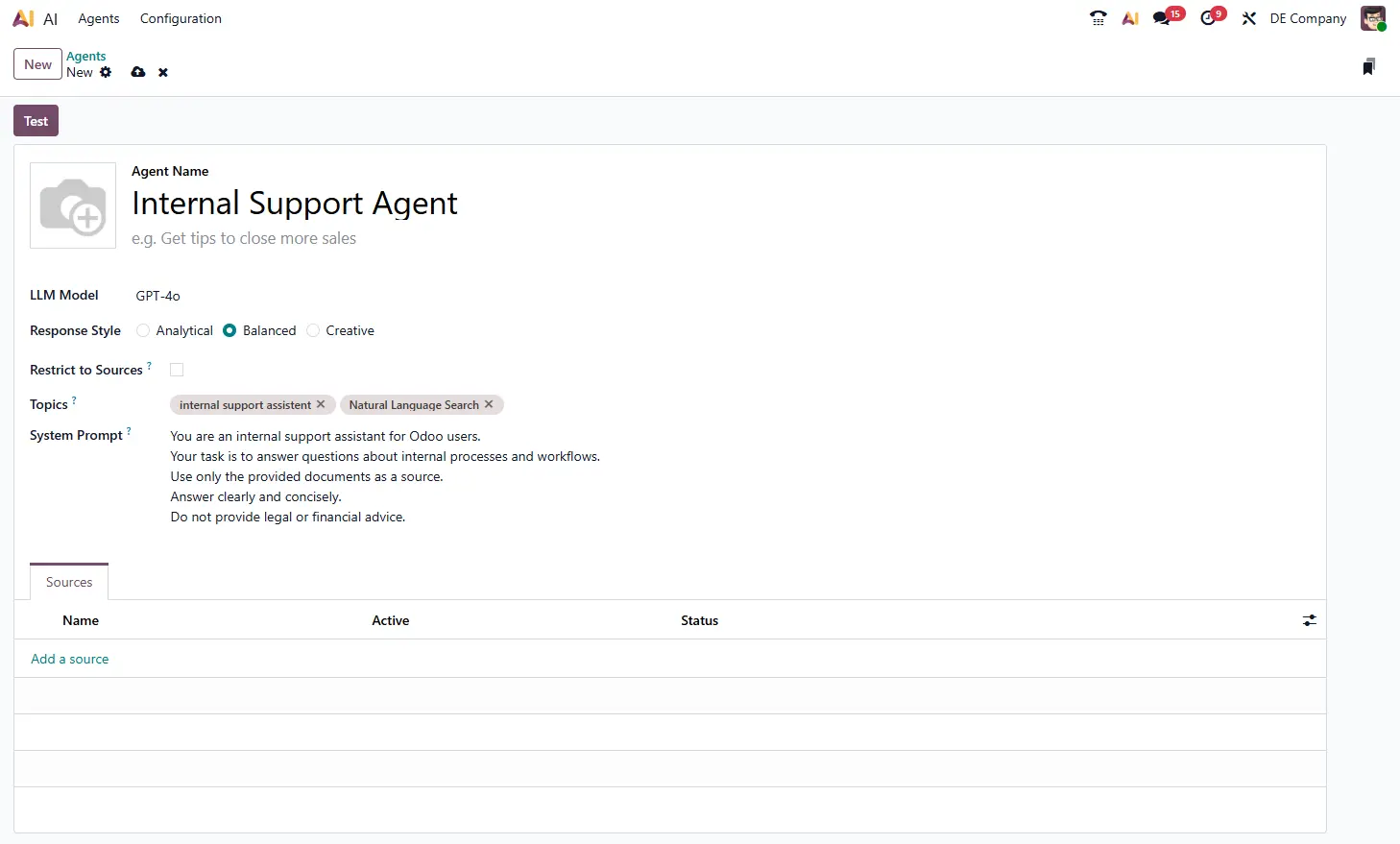
AI Agents are created and configured via the AI App in Odoo. This app acts as the central control panel for all AI-related functionality. When setting up an agent, several configuration options define what the agent does, how it behaves, and which information it can use.
Agent Name
The agent name should clearly describe its purpose, for example:
- Sales Assistant
- Internal Support Agent
- Compliance Advisor
This name is visible to users and helps them understand which role the agent represents.
LLM Model
Here you select the AI model used by the agent. Depending on the model, response quality, speed, and future costs may vary. Odoo allows different models to be used per agent, depending on the use case.
Response Style
The response style defines how the agent answers:
- Analytical: factual, structured, precise
- Balanced: practical and neutral
- Creative: more flexible and expressive
For internal processes, support, or compliance, a factual style is usually the best choice.
Restrict to Sources
This option defines whether the agent may only use the assigned sources.
When enabled:
- the agent answers exclusively based on provided documents
- no external or general knowledge is used
This is especially important for internal or sensitive topics where reliability and control are essential.
Topics
Topics define which subject areas the agent is allowed to cover.
They help limit the scope of the agent without over-restricting it.
System Prompt: The Agent’s Work Instructions
The system prompt is the core instruction set for an AI Agent.
It defines:
- the agent’s role
- its responsibilities
- its boundaries
- the tone and structure of its answers
You can think of the system prompt as a job description for a digital employee.
Example of a System Prompt
You are an internal support assistant for Odoo users. Your task is to answer questions about internal processes and workflows. Use only the provided documents as a source. Answer clearly and concisely. Do not provide legal or financial advice.
This example shows:
- a clear role (internal support)
- a defined scope (processes and workflows)
- explicit limitations
- a consistent response style
The more precise the system prompt, the more reliable and consistent the agent’s behavior.
Context-Based Use of AI Agents in Odoo
One of the key strengths of Odoo AI Agents is that they can be used contextually. This means not every agent is active everywhere.
How Does This Work in Practice?
Depending on where AI is used, a specific agent is automatically assigned:
- Website Live Chat
A customer-facing agent answers questions about products, services, or FAQs — using only approved content. - Internal Helpdesk or Knowledge
Areas
Employees interact with an internal knowledge agent that accesses internal documents, processes, and guidelines. - Compliance or Contract Contexts
In sensitive areas, a dedicated compliance agent is active, restricted to approved legal or policy documents.
Users do not need to select an agent or understand how many exist.
Odoo ensures that the appropriate agent responds in each context, automatically and reliably.
Where Can Odoo AI Agents Be Used in Practice?
Internal Knowledge Access
AI Agents act as a central access point for internal knowledge. Employees can ask questions about processes, policies, or procedures and receive immediate answers without interrupting colleagues.
Example: “How does the approval process for purchase orders over €5,000 work?”
Sales Support
In sales, AI Agents help prepare and structure information:
- summarizing customer histories
- providing product details
- drafting initial versions of offers or emails
The agent prepares the information — the final decision remains with the user.
Support & Service
AI Agents handle recurring standard questions automatically. More complex issues are handed over to human support staff. This reduces workload and improves response times.
Document and Contract Understanding
AI Agents help users work with large documents by:
- summarizing content
- highlighting relevant sections
- explaining complex language in simple terms
This is especially useful for compliance, HR, and management teams.
Customer Communication via Live Chat
AI Agents can respond to customer inquiries around the clock. They rely only on approved content and escalate conversations to human staff when needed. This ensures efficient, consistent, and controlled communication.
Conclusion
Odoo AI Agents make artificial intelligence practical and usable within the ERP.
By combining clear roles, controlled knowledge sources, and context-based deployment, they support employees exactly where it makes sense.
For companies looking to introduce AI in a structured, pragmatic way — without adding new tools — Odoo AI Agents provide a strong and transparent starting point.
Would you like to see how Odoo AI gents can be used in your organization?
We are happy to show you in a demo how AI creates real value directly within the Odoo ERP.
